Canceling your Originality.ai subscription takes about a minute from your account dashboard, and the one thing to check first is Credit Topup — even after you cancel, an active topup setting can trigger a charge when your balance runs low. Below are the exact steps to stop your billing, plus what to expect afterward.
Cancel your Originality.ai subscription (web account)
Originality.ai bills directly through its website, so there’s no App Store or Google Play subscription to manage — everything happens inside your account.
- Log in to your Originality.ai account.
- Go to the cancel subscription page and open Your Current Plan.
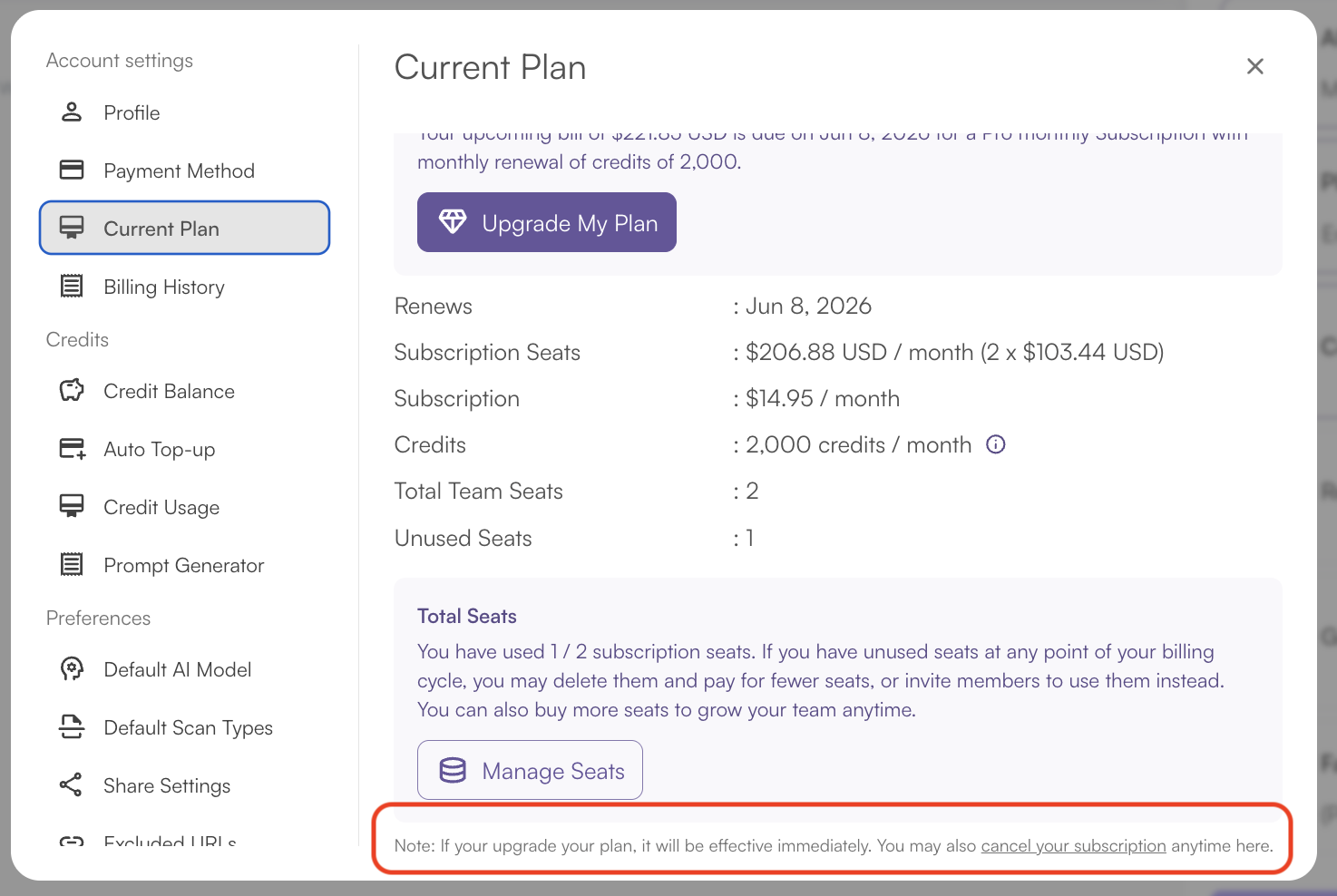
- Click “Cancel your subscription.”
- Complete the short cancel survey that appears.
The survey is required to finish canceling. You’ll see a short cancel survey after you click the cancel button, and it exists mainly for product feedback.
- Click “Confirm and Cancel” to finalize.
Your subscription will be canceled after finishing the survey and clicking the “Confirm and Cancel” button. If you don’t see this button, you haven’t finished the survey. If it won’t appear, you can contact us at support (the chatbox on the bottom right) and we will cancel for you.
Turn off Credit Topup (do this too)
Canceling your plan stops the renewal, but a separate auto-topup setting can still charge you.
- Open your account topup settings.
- Uncheck Credit Topup so a low balance can’t trigger a new charge.
You won’t be billed again unless it’s initiated by you. Be sure to uncheck Credit Topup so you won’t be billed if your balance is low.
What happens after you cancel
You keep what you paid for through the end of the current cycle. Once you cancel, your monthly credits and features will be available until the end of the current subscription. For example, if you started your subscription on November 5th and cancel it soon after, your subscription will be active until December 4th.
On billing and refunds, cancellation is forward-looking only. Cancellation stops future renewals but does not automatically refund prior charges.
Refunds aren’t guaranteed. Unless required by applicable law or expressly stated in an order form or supplemental refund policy, fees are non-refundable once paid, and consumed services like completed scans and used credits can’t be refunded.
If you want to request one anyway, submit a refund request by contacting support with your name/email, reason, and whether you want your original payment method refunded or an account credit. Note that refunds are handled case by case for reasons such as:
- Service disruptions
- Billing errors
- Any other reason they see fit
One last thing on your remaining credits: “Pro” and “Enterprise” credits are available via a monthly subscription and expire at the end of your monthly billing cycle, so use them before your access ends. If you’re on Pay As You Go instead, those credits are purchased via a one-time payment and expire 2 years after the purchase date if unused.